

Virtual Staging
What Is Virtual Staging? A Practical Guide for Real Estate Agents
Learn what virtual staging changes, how it works, when to use it, and how to review realistic listing photos and check disclosure requirements.
Virtual staging is the digital furnishing of a photograph of a real property. It helps buyers understand how an empty or underfurnished room could work without physically furnishing the home. Furniture, rugs, artwork, lamps, and other decorative items are added to show a possible arrangement of the space; the furnishings exist in the image, not in the property.
Agents and property marketers use these images to explain how a room could function. A useful staging image preserves the room’s actual architecture and condition while making its furnishing possibilities easier to understand. Showing a different floor, a moved wall, or a proposed kitchen is a different kind of visualization. PicchuSpot’s virtual staging service focuses on furnishing property photographs.
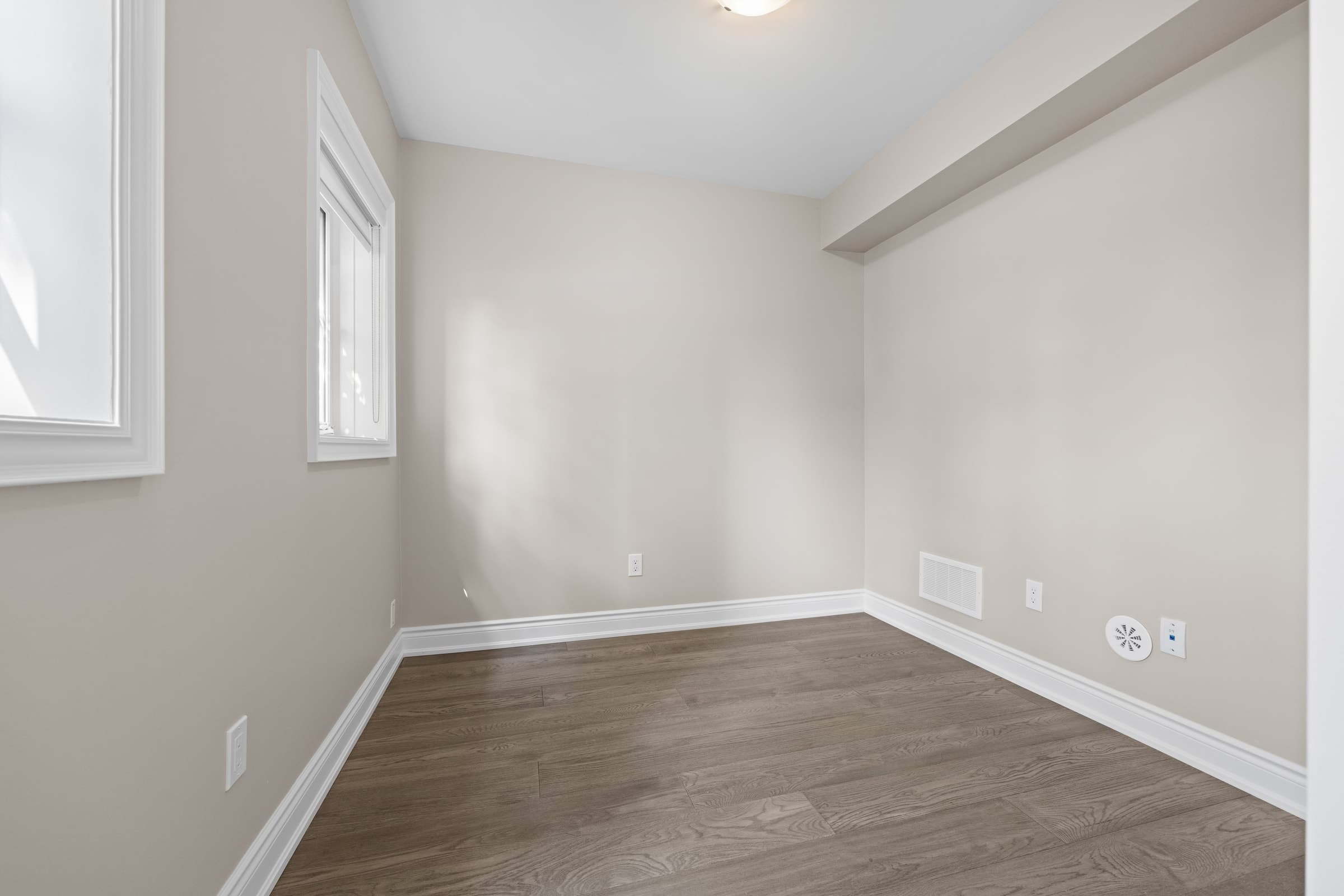 BEFORE
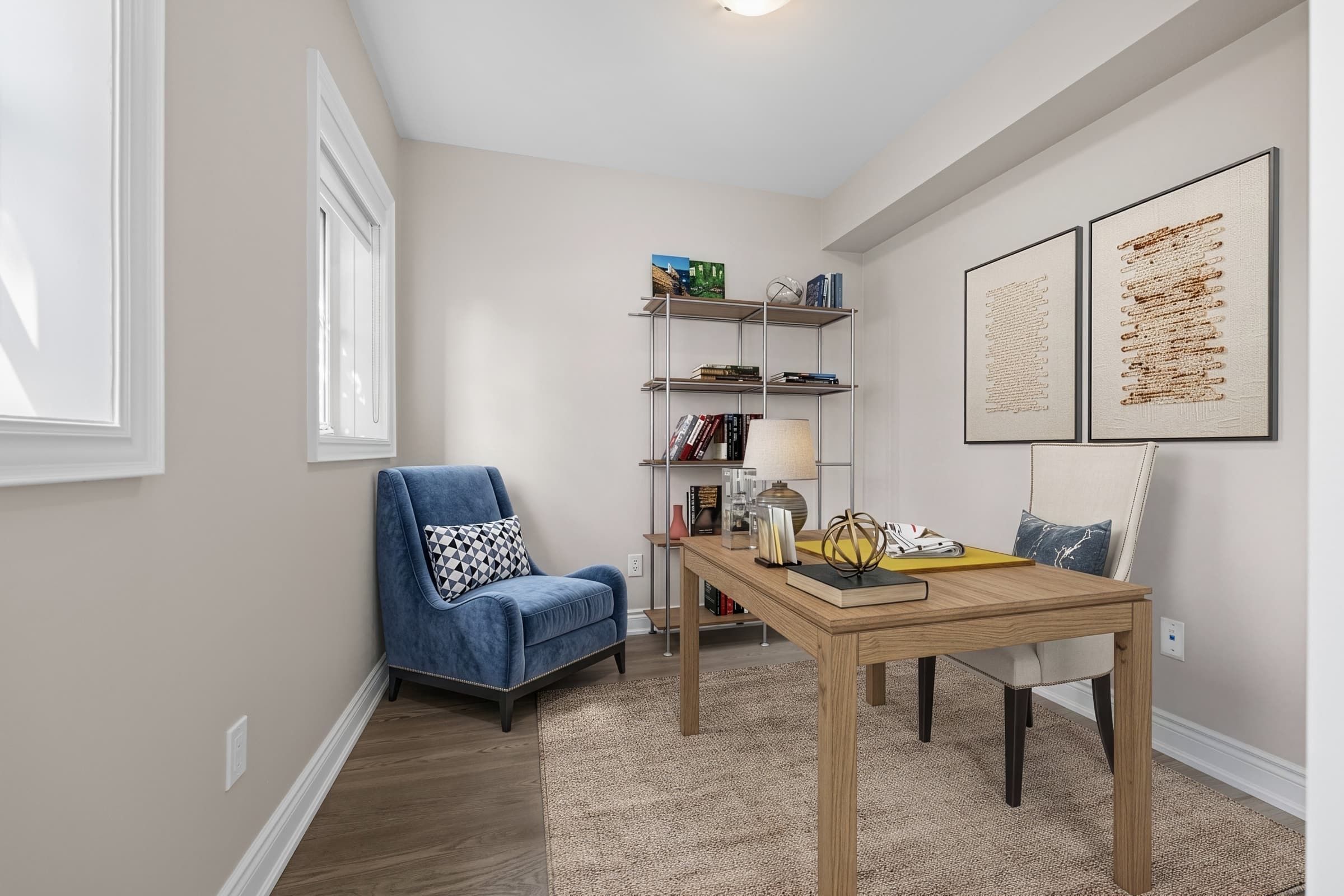 AFTER
AFTERWhat changes in a virtually staged photo?
A staging brief might ask for a sofa facing the fireplace, a dining table beside the kitchen, or a bed with enough space to move around it. These choices illustrate a possible use of the existing room.
Providers sometimes use “virtual staging” broadly. For a clear brief, distinguish the work by what the image changes:
| Type of work | What it changes in the image | What to clarify |
|---|---|---|
| Virtual staging | Adds or arranges furniture, rugs, freestanding lamps, artwork, and decor | The furnishings are illustrative; fixed property features should remain as photographed. |
| Digital decluttering or item removal | Removes existing movable contents | The objects may still be present at the property. Removal can also require disclosure. |
| Image enhancement | Adjusts photographic qualities such as exposure, color balance, or sharpness | Check the actual edits: some providers include more substantial alterations under this name. |
| Virtual renovation | Shows different finishes, installed fixtures, walls, or other physical features | The image represents a proposed changed condition, not simply a furnished room. |
| Proposed construction visualization | Depicts a space or building that does not yet exist in its illustrated form | Identify it as proposed and check where that representation may be used. |
These are practical distinctions, not universal legal categories. Service terminology varies; for example, NAR’s consumer guide uses virtual staging broadly enough to include renovation concepts.
A freestanding floor lamp and a replacement ceiling fixture illustrate the difference. One is a furnishing; the other changes a feature of the property. The same distinction applies to a rug versus replacement flooring, or a dining arrangement versus removing a wall to create an open kitchen.
If existing furniture needs to disappear before new furniture is added, the brief includes item removal or virtual cleaning. If the image needs a new kitchen, changed finishes, or a different layout, discuss virtual renovation as a separate scope. A label does not automatically make those changes acceptable in a listing.
You may also hear “CGI” or “architectural visualization.” These are broader production terms. Computer-generated objects can be composited into a real photograph, while a complete proposed space can be visualized before it exists in that finished form. The important question is what the final image claims to show. Adobe’s compositing documentation explains the image-matching side of that process.
How does virtual staging work?
A useful workflow begins with the property photograph and ends with a reviewed image in its intended marketing context.
- Choose the photograph. Use a sharp original with useful views of the room, its floor, and its fixed features. Flag unclear or distorted areas before work begins.
- Explain the room and the brief. Specify its intended function, preferred style, and features that must remain visible. Supply dimensions or a floor plan when furniture fit matters.
- Identify related views. If several photos show the same room, say so and request a consistent furnishing arrangement.
- Produce the staging. Software, a designer, or a combination adds the furnishings and integrates them with the photograph.
- Review and correct. Compare the output with the original, then request permitted revisions or adjust the software’s settings.
- Prepare it for publication. Follow the destination’s disclosure and original-photo requirements, then check the images as they actually appear.
Uploads, style choices, references, review, and corrections are common parts of a staging workflow. The important part is that the brief and the published result stay aligned.
AI, managed service, and hybrid workflows
AI describes how an image may be produced. A managed service describes who handles the brief, production, and corrections. These categories can overlap: a professional service may use AI, manual editing, 3D compositing, or a combination.
| Workflow | Your involvement | What to check |
|---|---|---|
| Self-service AI | Upload a photo, select available room/style controls, generate options, and inspect the output | Whether the controls and correction options suit your room; you still need to review the final image. |
| Managed professional service | Provide photographs and a brief; the provider manages production and a correction process | Who reviews the work, what customization is included, and what counts as a revision. |
| Hybrid AI-assisted service with human review | Supply a brief; automation contributes to production and a person reviews or refines it | What the human review includes and how problems are corrected. |
Available controls vary by product, and a generated option is not automatically a finished image ready for a listing.
Choose a workflow around your brief, available review time, and correction needs. A fast generated image and a finished image ready for your listing are different milestones.
When is virtual staging useful?
Start with a specific question the photograph does not answer well.
- A vacant living room: where could seating go without blocking doors or the fireplace?
- An open-plan space: how might dining and living areas fit together?
- A spare room: what would one plausible office or guest-room arrangement look like?
- A completed new-build interior: how could the finished space be furnished before real furniture is delivered?
- A room dominated by existing furniture: would a disclosed removal-and-restaging brief make the underlying layout easier to understand?
These are useful applications to consider, not promises of a better sale. In NAR’s 2025 survey, 83% of buyers’ agents said home staging helped buyers visualize a property as a future home. That finding concerns home staging generally, not a measured effect of virtual staging alone. NAR’s original report
For photographers, a practical addition to the shoot brief is to identify rooms that may be staged and capture clear views of their fixed features. For developers, distinguish photographs of completed spaces from illustrations of work that is still proposed.
When another approach makes more sense
If the original already communicates the room clearly, another staged image may add little. If the source is blurred, severely distorted, or missing important details, consider a better photograph first.
If the requested transformation depends on replacing floors, moving windows, hiding damage, or inventing a view, it is not a straightforward furnishing brief. Resolve the scope and intended use before commissioning it. If the relevant listing requirements cannot be met, do not publish the edited image there.
Do you need to disclose virtual staging?
Disclosure and original-photo requirements vary by MLS and jurisdiction. Check the current rules for your listing, your brokerage’s instructions, and the platform where the image will appear. NAR’s Code requires REALTORS® to present a true picture in advertising and prohibits misleading images; it does not prescribe one universal staging watermark or original-photo format. NAR Code of Ethics
The differences are practical:
| MLS | Examples of its published requirements |
|---|---|
| CRMLS | Identify the alteration in the photo description and place the corresponding original immediately before or after it. A photographer-added watermark is not required by the guidance. CRMLS guidance |
| ARMLS | Use the MLS-system-provided disclosure watermark and place the corresponding original immediately before or after the altered media. ARMLS rules |
| BeachesMLS | Disclose virtual staging in the photo description and public remarks. Its FAQ says the original does not have to appear alongside the staged image. BeachesMLS FAQ |
California has additional statutory requirements for certain digitally altered images used by brokers, salespersons, or people acting for them in real-property sale advertising. Within the scope defined by California Business and Professions Code §10140.8, these include:
- conspicuous disclosure that the image has been altered;
- public access to the corresponding original image;
- specific requirements for how originals are made available on controlled websites.
A generic caption or an offer to provide originals on request should not be assumed sufficient. California Business and Professions Code §10140.8
Disclosure does not override restrictions on the edit itself. CRMLS, for example, restricts changes to physical property features even when an image is identified as altered. A proposed renovation image therefore needs more consideration than simply adding “virtually staged.”
Keep the original with the edited version, identify what changed, and confirm the required label, fields, photo order, or access link. After posting, check that the disclosure and any required original are visible. These US examples do not establish the requirements for listings in Canada, the UK, or Australia.
What makes virtual staging look realistic?
Attractive furniture is only part of the result. The objects need to belong to the photograph’s viewpoint, lighting, and space.
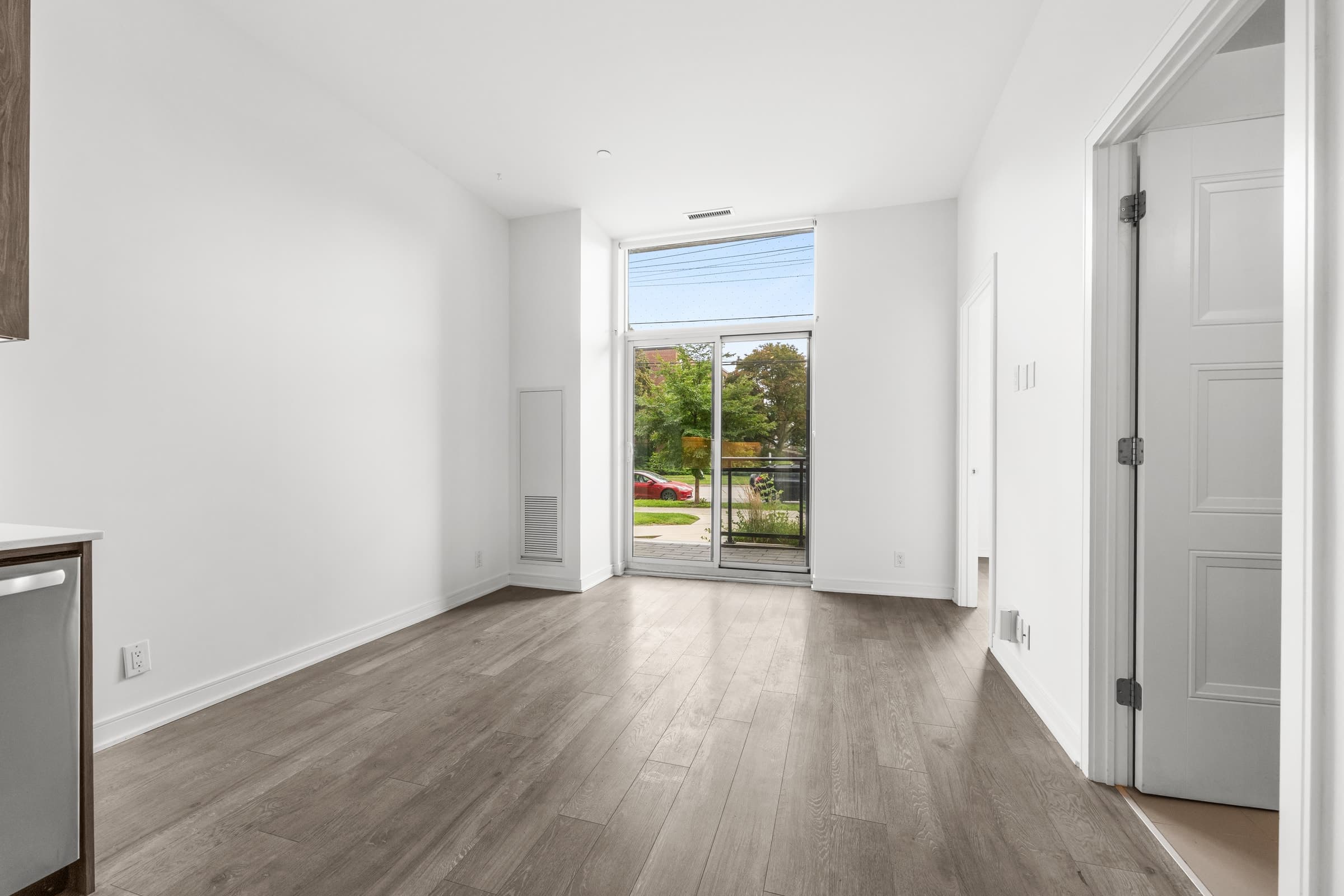 BEFORE
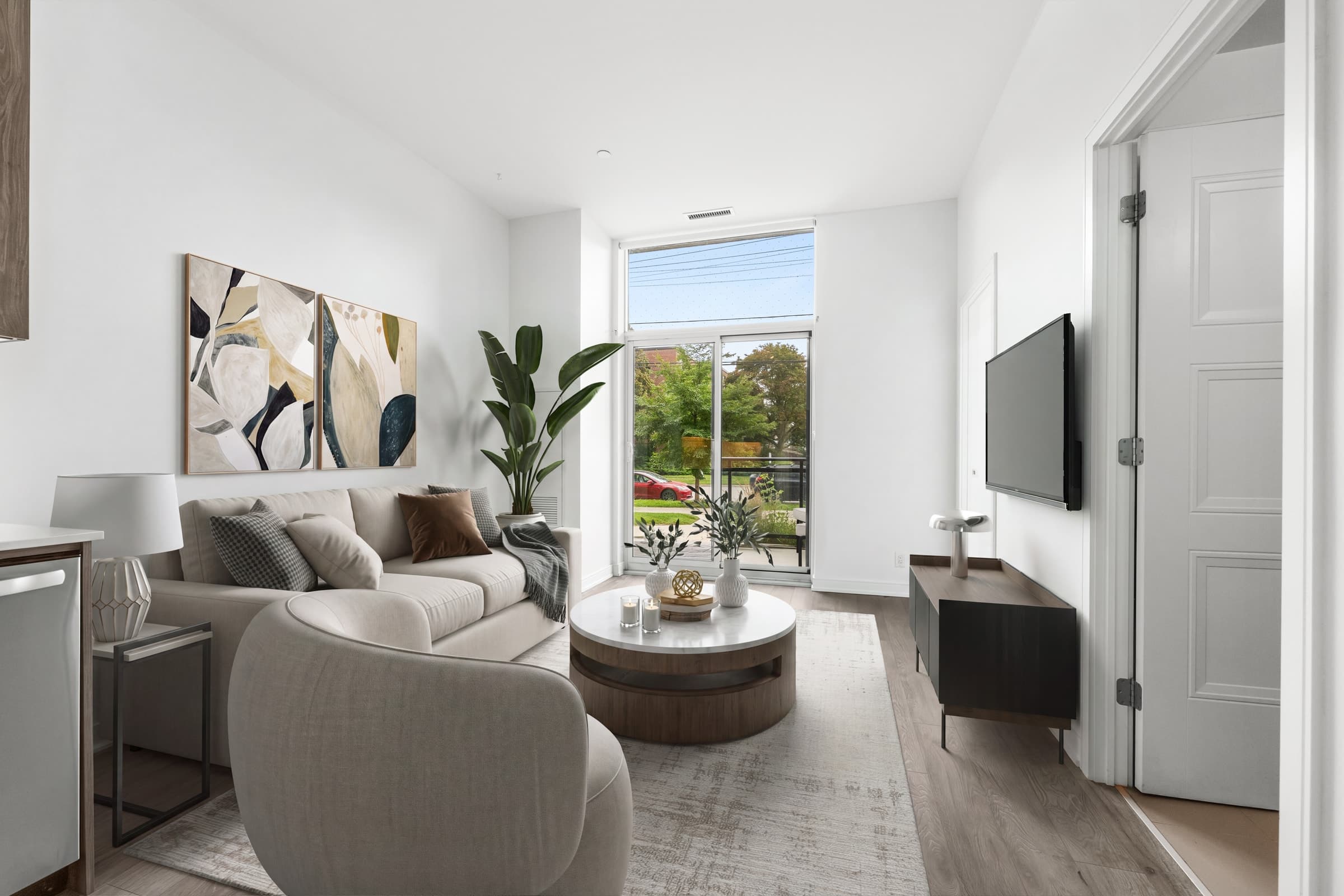 AFTER
AFTERPerspective, scale, and usable space
Perspective means the furniture follows the room’s camera angle and receding lines. A table should not look as though it was photographed from a different height than the floor beneath it. Matching a camera view and the apparent scale of inserted objects are fundamental compositing tasks. Adobe’s Match Image documentation
Scale needs more than a convincing appearance. An undersized sofa can make a room look unusually spacious. Check important pieces against supplied measurements, and leave plausible access to doors and fixed features. A photograph of a furnished arrangement is not a measured furniture plan.
Ask a simple question: could someone use this arrangement comfortably, or does it merely fill the frame?
Light, shadows, overlap, and reflections
Look for these details:
- Light direction and softness: the added furniture should respond plausibly to the room’s windows and visible lighting. Strong sunlight and soft ambient light produce different effects.
- Contact shadows: furniture bases and legs should meet the floor convincingly. Floating feet or an artificial dark halo deserve a closer look. Shadow compositing is part of integrating an object into a photographed environment. Chaos documentation
- Occlusion: nearer objects should correctly cover objects behind them. A chair leg should not appear through a tabletop, and a sofa should not pass through a wall. Overlap is one of the cues people use to understand depth. Adobe’s depth-cue explanation
- Reflections: check mirrors, glass, and glossy surfaces for missing or inconsistent reflections. Reflections depend on the surrounding scene and illumination, including elements outside the camera frame. Adobe’s compositing guidance
Review both the full-room image and a closer view. Small errors can be easy to miss when you are concentrating on the overall style.
Architecture and consistency across photos
Compare the original and staged photographs for windows, doors, wall edges, flooring, built-ins, fixtures, and the view outside. For a staging-only brief, those features should remain faithful to the original. Furniture and decor should not be used to conceal known material damage.
Then compare different views of the same room. The sofa should occupy the same location; furniture should not change identity between angles. Some tools are designed to help coordinate related views, but the delivered set still needs inspection. Neither an AI label nor a human-review label proves that every detail is correct.
How many photos should you virtually stage?
Choose the number by the questions the listing needs to answer, rather than a fixed quota.
For a modest vacant home, you might start with the main living area and a bedroom whose furnishing arrangement is difficult to read. Add an open-plan dining view or an unusual space if it explains something new. This is a practical starting point, not a research-backed optimum.
Two photos of one room can be useful when they explain different relationships—for example, seating near a fireplace and the route through to the kitchen. Coordinate the furnishings across those views. Include the originals in the form required for the listing, and avoid adding near-duplicate staged images simply to increase the count.
How much does virtual staging cost?
PicchuSpot currently lists Virtual Staging at US$19 per image, with standard delivery estimated at 24–48 hours. For provider comparisons, billing models, optional extras, and listing-budget examples, see How Much Does Virtual Staging Cost in 2026?
For current timing conditions and revision scope, check the PicchuSpot service terms.
Virtual staging vs. physical staging
Virtual staging changes the photographic presentation. Physical staging changes what visitors experience at the property.
| Consideration | Virtual staging | Physical staging |
|---|---|---|
| Where the furnishings exist | In the image | In the home |
| What you review | The edited photograph and its accuracy | The actual arrangement and its presentation |
| What a visitor encounters | The property’s real furnishing condition, which may be empty | The installed furnishings, while they remain in place |
| Main planning requirement | Photography, editing, review and disclosure | Physical preparation, furniture and access arrangements |
This distinction is reflected in NAR’s staging guidance. Consider the part of the marketing experience you need to improve. A photograph can illustrate an arrangement; it cannot provide the experience of walking through that furnished room.
Is virtual staging worth it for your listing?
Use four questions to make the decision:
- Is there a specific furnishing or room-function question the original photo leaves unanswered?
- Can you answer it without misrepresenting the property’s features or condition?
- Can you review and correct the images before your deadline?
- Can you meet the publication requirements and set accurate expectations for a showing?
If the answers are yes, virtual staging may be a useful addition to the marketing. If the main problem is the source photography, the property’s physical presentation, or a proposed renovation, address that need directly.
Frequently asked questions
Is virtual staging the same as AI staging?
No. Virtual staging describes the furnished image and its purpose. AI is one possible production method. A managed service may use AI, other editing tools, or a combination.
Can virtual staging remove existing furniture?
A project can combine furniture removal with new staging, but removing objects is an additional edit. Clarify the scope and disclosure requirements, and remember that the original furniture may still be present at the property.
Is virtual staging misleading?
It can be if it hides condition, distorts space, changes property features, or creates expectations the actual property does not meet. Review both the image and the way it is presented. A disclosure does not make an otherwise prohibited alteration acceptable.
Can you virtually stage an unfinished property?
Distinguish adding furnishings to a photograph of completed space from depicting completed construction or renovations that do not yet exist. The latter is a proposed-condition visualization. Check whether the intended listing channel permits it; do not present it as the property’s existing condition.
Does virtual staging make a home sell faster?
There is no reliable universal sale-speed promise you can apply to an individual listing. The NAR home-staging evidence discussed above does not isolate virtual staging’s effect. Use staging to communicate the space accurately, rather than treating it as a guaranteed sales result.